
Here are some frequently asked questions with answers. Feel free to reach out to us if you have additional questions.
- Do you have a free trial?
- Can I cancel at any time?
- How do I cancel?
- If I sign up for monthly, can I upgrade to annual later and still get the annual discount?
- How do I upgrade, downgrade, or change my subscription level?
- Can my team use a single subscription, or do I need one for each salesperson?
- How do I add my sales reps to my account?
- Why would I use this for more than one month?
- How does the billing work?
- How is this different from using AI for a sales script?
- Does using scripts really work?
- How good are the scripts SalesScripter produces?
- How does SalesScripter build scripts for my situation?
- How does it work?
- What if I need help or have questions?
- How does the affiliate program work?
- What is the commission rate for referred leads?
- Where can I find more details about the program?
Pricing
Do you have a free trial?
Yes, we have a free trial version. It includes most of the SalesScripter functionality but excludes our AI sales script generator, preloaded sales messages, email automation, and phone functionality.
Can I cancel at any time?
We offer monthly subscriptions that renew automatically and annual subscriptions that renew annually—both of which you can cancel at any time. No refunds are issued for the remaining time on your subscription after you cancel. If you cancel mid-pay period, you will retain access until your renewal date.
How do I cancel?
In the account management area, there is an option to cancel. That will cancel the automatic rebill for your subscription. If you cancel, you will still have access to the software until your next billing payment date, at which time your account will expire, and you will then lose access.
If I sign up for monthly, can I upgrade to annual later and still get the annual discount?
Yes, you can upgrade from monthly to annual at any time, and you will get the annual discount with your purchase.
How do I upgrade, downgrade, or change my subscription level?
We currently do not have an upgrade feature that will switch you over to a new subscription level and calculate the prorated difference. With that, the process is to go to our pricing page and purchase the subscription level you would like to switch to. Then contact us through the ticketing system to let us know about your desired account change, and we will then process a prorated refund for the remaining payment on your canceled subscription.
Can my team use a single subscription, or do I need one for each salesperson?
SalesScripter is licensed on a per-user, per-month (or per-year) basis. Each person who accesses the system will need their own account.
How do I add my sales reps to my account?
After you purchase your account, if you return to our pricing page and click SIGN UP, you will see the “Add-On User” subscriptions displayed. These are for the salespeople or users you would like to add. Select Add-On User monthly or annual, and you can then enter the number of users you would like to add. Once purchased, you will see a new “Subusers” section on your account management page. This is where you will add the users, and you will have the ability to enter their names, email addresses, and create their user IDs.
Why would I use this for more than one month?
You can create and download your scripts and cancel during your first month. The reasons you might want to keep your subscription longer than that are:
-
-
- If you want to create and modify your scripts on an ongoing basis.
- If you use some of our tools for ongoing prospecting, such as interactive scripts, sales role-play tools, email automation, and CRM.
- If you use the system to share your scripts with your sales team.
-
How does the billing work?
You will be charged when you create your account, and that day will then become your billing date. If you purchase a monthly subscription, you will be charged that day every month until you close your account. With the annual subscription, you will pay for the full year and will then be charged every year on that day until you close your account.
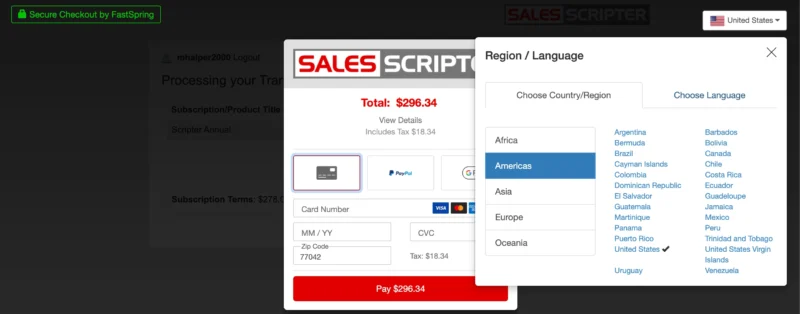
I live outside the US and do not have a zipcode. Am I able to purchase outside the US?
Yes. Our shopping cart is specifically designed to allow for purchases outside the US. When you select the subscription you would like to purchase and get to the payment screen, there is a country drop-down in the top right. When you expand that and select your country, the form will then update to display the fields and payment options that are specific to your country.
General / How does SalesScripter Work?
How is this different from using AI for a sales script?
You can certainly ask AI to create a sales script for you. But there are some ways SalesScripter is different and better.
First, AI is an excellent sales copywriter. It has deep knowledge about many products, services, and industries. But putting all of that together into a good sales script is still hit-or-miss. This is how SalesScripter helps: we leverage AI to generate individual talking points and questions, then use our expertise and toolset to assemble them into an effective sales script.
Secondly, when AI spits out sales scripts and sales copy for you, you still need a place to store that output. SalesScripter provides that with our sales playbook, a central place and tool set you can use to access all your talking points and questions.
Does using scripts really work?
Many people believe using sales scripts is a bad thing and that they do not work. We agree that if you use a script and read it directly when talking with a prospect, you won’t make the best impression or have consistent, positive interactions.
This is why we focus more on developing lists of questions and talking points to make, rather than a page-long script to read directly from. When you have a list of key things to say, you can then use that as a guide when prospecting, and this can help to greatly improve your results and consistency.
How good are the scripts SalesScripter produces?
SalesScripter actually asks you questions about what you sell and the prospects that you sell to. The answers you provide are what feed into the script library and documents.
This means that not only are the scripts custom-tailored to your situation, but also that the strength and quality of the scripts that are produced somewhat depend on how well you answer the questions. But the majority of the tactics and scripts they employ have been fully tested and proven effective in a telesales outsourcing operation.
How does SalesScripter build scripts for my situation?
SalesScripter actually asks you questions about what you sell and the prospects that you sell to. The answers you provide to all the questions feed into the script library and documents. This allows the scripter to produce scripts tailored to your situation.
How does it work?
SalesScripter will walk you through a series of questions that will ask you about what you sell and how you help your clients or customers. These questions are designed to extract the key details about what you have to offer and the challenges that you help to resolve. From there, all of these powerful details are plugged into a library of sales scripts, templates, and tools.
What if I need help or have questions?
SalesScripter is a powerful tool when filled out, but it can be easy to run into questions during the process. We are here to help and have a number of different options for accessing help and support:
-
-
- Check out our blog for posts that explain some topics and principles.
- We have put together a number of training videos to help demonstrate how to fill out and use SalesScripter.
- We have a book aligned with the tool that explains all the concepts in more detail.
- We have a web-based sales training program that goes through all of these concepts in great detail.
- If you would like one-on-one help, we offer a service that helps you fill out your form. Not only do we explain the tool, but we also help you wordsmith your answers.
-
Can I edit the scripts?
When your answers to questions are populated into the scripts, you can actually click the part of the script that contains your info and edit it right there to make any changes. The text in the script is fixed and cannot be edited. If you would like to edit the fixed text, you can copy the content and dump it into a format like Microsoft Word and edit from there.
How does the affiliate program work?
When you are a SalesScripter user on any subscription level, you automatically become a SalesScripter affiliate. In our affiliate program, you will get 30% of any subscriber fees for users that you refer over.
The only thing that needs to happen is that the referred user will need to come to SalesScripter from your affiliate URL, which can be found on the Affiliate Tab in your membership area.
When they come to the site by clicking on your link, a cookie will be stored on their device. Since a cookie will be installed, we will be able to know they came from you even if they come back at another time and do not use your affiliate URL.
You will be paid at the beginning of each month a commission for any referred users, and payments are made through PayPal.
What is the commission rate for referred leads?
In our affiliate program, you will get 30% of any subscriber fees for referred users for the life of the user.
Where can I find more details about the program?
You can find out more details about our affiliate program at our affiliate program page.